Parking sensors (car icon in digital dash)

irtg

Member
Joined
Oct 31, 2023
Messages
32
Reaction score
17
Points
8
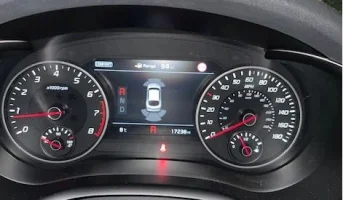
When I go into reverse, a car icon appears in the digital dash (main dash behind steering wheel) showing any nearby objects. It disappears after about a second, and only reappears when I'm almost hitting an object.

I can get the same icon up by pressing the parking sensor switch if parking forwards, but again it goes away almost immediately and only comes back when the red alarm goes off.

Is there any way to keep the car icon on the dash when parking so I can see nearby objects that I'm more than a couple inches away from?
 
picture. model year. trim. I've never seen a 'car icon' when parking. all I get are the colored parking fans.
 
When I go into reverse, a car icon appears in the digital dash (main dash behind steering wheel) showing any nearby objects. It disappears after about a second, and only reappears when I'm almost hitting an object.

I can get the same icon up by pressing the parking sensor switch if parking forwards, but again it goes away almost immediately and only comes back when the red alarm goes off.

Is there any way to keep the car icon on the dash when parking so I can see nearby objects that I'm more than a couple inches away from?
What kind of car do you have?
 
______________________________
2018 2.0 GT Line. It's the coloured parking fans I'm looking for (they surround the car icon) - will try get a pic and upload - it's just the standard parking icon that comes up on digital dash when getting close to objects.
 
it should stay on until you put the car back in P or exceed a certain speed, unless there's a more urgent message to display, like door open, fasten seat belt, etc.

is the little led above the switch lit while the icon disappears?
 
From interior to exterior to high performance - everything you need for your Stinger awaits you...
This is the car icon I meant. It literally goes off after about a second or less (unless I'm about to hit something). Even when I put the car in reverse, it only stays on screen really briefly, then returns to the MPH display - I never get to see the yellow fan warnings, it's like it decides there's nothing close so switches off, then comes back on when it's red with audio warnings and about to collide.

Just realized my seatbelt warning light is on in the pic, but am sure it does it when I've got the belt on also - will check again :)

Edit: Problem still occurs when seatbelt plugged in, no other warnings etc. Disappears after a second or less, even if I leave it in reverse - very weird.
 

Attachments

  • Car Icon.webp
    Car Icon.webp
    23.3 KB · Views: 13
Last edited:
that is more clear explanation. and it should not be doing that. in over five years with the stinger I've never seen anything like you describe. I never turn the sensors off. it almost sounds like yours are turning themselves off but what could cause that?
 
Yeah it's strange, I wasn't sure if it was normal behaviour as they do come on when you get close to something but I thought the icon should be visible the whole time when you are parking.

Added a short vid which shows me going into reverse - parking icon appearing then disappearing immediately - then I reverse toward the garage and it comes on again as I get close. A lot of times it doesn't come on until it's amber or red which is a bit close for comfort.

Seems like it decides to disappear when it doesn't see anything close and reactivates as I approach an object.
 

Attachments

Last edited:
does it do the same when other options are on the display? (ie not the compass, maybe fuel economy or something like that)?
have you spilled any fluids near the center console that could be messing with the PDC switch?
 
Yeah it's strange, I wasn't sure if it was normal behaviour as they do come on when you get close to something but I thought the icon should be visible the whole time when you are parking.

Added a short vid which shows me going into reverse - parking icon appearing then disappearing immediately - then I reverse toward the garage and it comes on again as I get close. A lot of times it doesn't come on until it's amber or red which is a bit close for comfort.

Seems like it decides to disappear when it doesn't see anything close and reactivates as I approach an object.
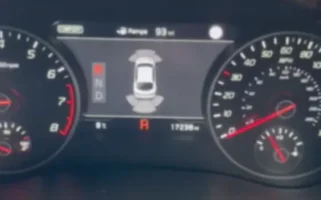
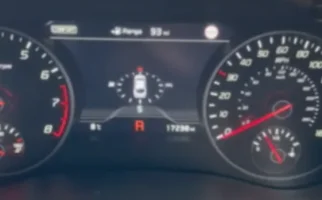
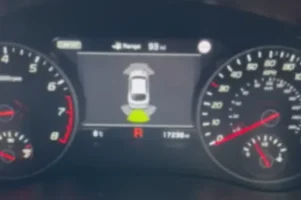
from the video - for those who don't want to download and extract and watch.

shift into reverse
1699374951851.webp
1 second later, still in reverse
1699374962742.webp
approach object
1699374987278.webp
 
______________________________
From interior to exterior to high performance - everything you need for your Stinger awaits you...
Thanks D.J. I should have saved them as stills.

@Snowwhite - it does it no matter what I have on the display. Haven't spilled anything myself but only got the car a couple weeks ago so somebody else might have..

It's not a huge deal, just a minor annoyance. Apart from that, I'm loving the car!
 
this isn't strange after all. your sensors and 'icon' are working normally. my reversing 'car icon' disappears after a moment too, unless or until I back up close to an object. you get the same approaching forward as soon as you arrive within the range of the green fan. if you don't see the green fan but only see the 'car icon' come on when the distance fan is red it must mean that you approach too quickly. try slooowly approaching, and you'll see the green, then yellow and finally the red distance fan. and keep your sensors on, that way you'll never get too close in front by forgetting that your sensors are off.
 
Thanks - sounds like it's just standard behavior then. When I thought it wasn't working properly I started pressing the button which possibly turned it off at times making things worse.

I assumed the sensors would stay active until I either turned them off or exceeded a certain speed - didn't know they'd turn off automatically if nothing in close range.
 
I just tried this and you are right. it does disappear from the center dash almost immediately in reverse. I hadn't noticed because I usually look at the cameras instead of the dash until the beeps start.
 
the same for me, dissapear after few seconds
 
Last edited:
From interior to exterior to high performance - everything you need for your Stinger awaits you...
I didn't notice that the 'car icon' disappeared either until I double-checked it yesterday to respond to this thread. lol. over five years in and I never noticed that it disappears in reverse. but my excuse is that 99% of the time I have the tpms screen up, and that same 'car icon' is there continuously, so only the psi info disappears for a second or two, then reappears. sort of like a blink is all. it took this thread to realize what was actually happening. for this experiment, I moved to the gauges screen. and as soon as the 'car icon' vanished in reverse, the gauges screen came on, and stayed on until I got close to the wall in reverse, then the 'car icon' and distance fans, in green, came back on to do their thing.
 
______________________________
Think I'm getting to the bottom of this now. Seems my sensors aren't remembering the last setting when I start my car. So unless I turn them on manually each time (or go into reverse) my front sensors don't work.
 
Think I'm getting to the bottom of this now. Seems my sensors aren't remembering the last setting when I start my car. So unless I turn them on manually each time (or go into reverse) my front sensors don't work.
Sensors go inactive after you reach a certain speed, they activate on choosing reverse or the button in the centre console, but they always deactivate when you hit the magic speed.
 
Sensors go inactive after you reach a certain speed, they activate on choosing reverse or the button in the centre console, but they always deactivate when you hit the magic speed.
The video posted by @irtg shows the screen disappearing after about second, while stopped (zero speed), while in reverse
 
Looks like both behaviors are normal then.

1. Sensors and Car icon come on briefly when the sensor button is pressed, or going into reverse
2. Car icon disappears if nothing in range (actual sensors remain active but there's no cockpit indicator of this)
3. Car icon will reappear with green/yellow/red fans when objects come into range
4. Sensors will turn off once a certain speed is reached. To activate again, either need to hit the button or engage reverse.

I was driving into parking spaces wondering why on earth the front sensors weren't activating when I was inches from the wall. So basically I've got to switch them on manually every time (or go into reverse which auto activates them).

I guess this behavior is to avoid annoying noise warnings when pulling close to cars in traffic - I just prefer a visible indicator when I'm close to stuff that I know is active all the time and I don't have to remember to press a button.

Thanks for all the replies!
 
From interior to exterior to high performance - everything you need for your Stinger awaits you...
Kia Stinger
Back
Top